image

Bagi anda yang sering menggunakan aplikasi desain grafis, tentunya anda mengetahui software Adobe Photoshop. Salah satu aplikasi pengolah gambar bitmap ini menjadi salah satu software favorit untuk urusan pengolah gambar. Photoshop sendiri menghasilkan file berextensi .psd, untuk gambar olahannya.

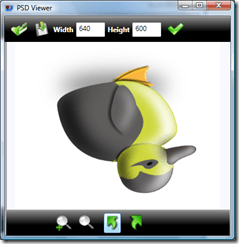
.PSD viewer adalah salah satu software yang bisa digunakan untuk melihat file berexensi .psd tsnps perlu menjalankan Adobe photoshop. Jika kebutuhan anda hanya ingin melihat sebuah file berextensi .psd tanpa ingin mengedit desainnya , maka software ini sangat cocok.

Selain membuka file .psd, software ini juga bisa untuk fungsi ‘rotate’ dan juga ‘zoom’.

image

image

image  

AREA DOWNLOAD

INFO

  • Dukung tim favoritmu di Piala Dunia 2010, dapatkan LAPTOP GRATIS, baca panduannya disini
  • Download Soal CPNS 2010 Gratis disini

6 tanggapan untuk ““View and Convert’ File PSD tanpa menginstall Photoshop”

  1. andri Avatar
    andri

    thanks gan berhasil juga di komputer saya

    Suka

  2. Techno Crazy Avatar

    Thanks for linking “psd viewer” download!
    It’s good and help 4 somebody to easy and to use that…^^

    Suka

  3. jaka zulham Avatar

    langsung pake PS aja deh mas…

    Suka

  4. Miftahgeek Avatar

    Untungnya di Linux tinggal nambah codec aja 😀

    Suka

  5. Mahfud Avatar
    Mahfud

    pake picasa juga bisa kok mas

    Suka

Tinggalkan Balasan ke Abdul Muiz Batalkan balasan

I’m Dian

Hello! Welcome to Akhdian’s blog. I am thrilled to share my knowledge and experiences with all of you. Currently, I am busy teaching and delving into various topics related to computers and technology. I hope this blog can be a valuable source of information for those who want to learn more about the world of computers. Thank you for visiting, and I hope you enjoy the articles here!

Let’s connect