Cara Membuat Daftar Isi WordPress.com

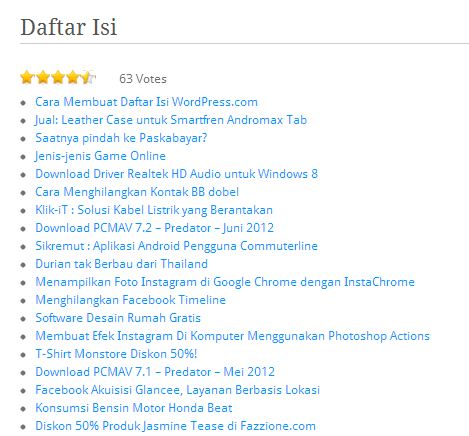
Daftar isi di blog merupakan hal yang penting. Daftar isi disini berupa daftar judul semua artikel yang di link ke artikel terkait.  Selain berfungsi untuk memudahkan navigasi, adanya daftar isi ini bisa untuk internal backlink.

Kali ini saya akan membuat tutorial untuk membuat daftar isi di blog berbasis wordpress.com.

Langkah-langkah membuat Daftar isi di wordpress.com:

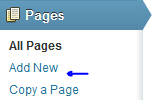
1. Buat Page baru dengan meklik Pages > Add New
image

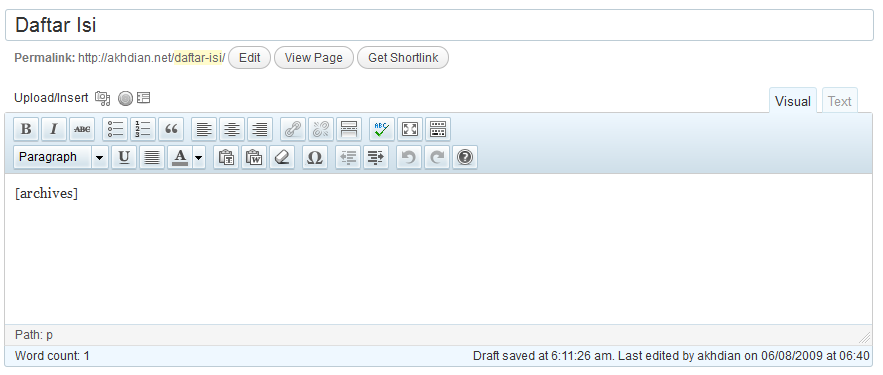
2. Ketik judul dengan “ Daftar Isi” atau bisa dengan yang lain.

3. Di bagian artikel ketikkan:

image

image

4.  Selesai, kemudian tekan  tombol Publish

Selamat mencoba!

52 tanggapan untuk “Cara Membuat Daftar Isi WordPress.com”

  1. qonithahboutique Avatar

    terimakasih info nya…

    Suka

  2. Sugato Avatar

    uda pake google blog ne.. klo ada kesempatan baru daftar wordpress..

    Suka

Tulis Komentar

I’m Dian

Hello! Welcome to Akhdian’s blog. I am thrilled to share my knowledge and experiences with all of you. Currently, I am busy teaching and delving into various topics related to computers and technology. I hope this blog can be a valuable source of information for those who want to learn more about the world of computers. Thank you for visiting, and I hope you enjoy the articles here!

Let’s connect